Badge
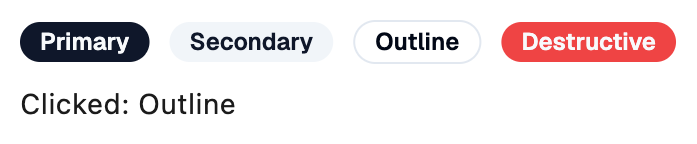
A Shadcn badge: a small label for a status, a tag or a count.
Example:
shad.Badge("New")
shad.Badge("Failed", variant=shad.BadgeVariant.DESTRUCTIVE)

Inherits: LayoutControl
Example
Shadcn Badge
play_arrowTry Online
import flet_shadcn_ui as shad

import flet as ft


def main(page: ft.Page):
    page.title = "Shadcn Badge"

    def handle_click(e: ft.Event[shad.Badge]):
        message.value = f"Clicked: {e.control.content}"

    message = ft.Text("Click a badge")

    page.add(
        ft.SafeArea(
            content=ft.Column(
                controls=[
                    ft.Row(
                        controls=[
                            shad.Badge(v.name.title(), variant=v, on_click=handle_click)
                            for v in shad.BadgeVariant
                        ],
                    ),
                    message,
                ],
            )
        )
    )


if __name__ == "__main__":
    ft.run(main)
Properties
bgcolorclass-attributeinstance-attribute
bgcolor: ColorValue | None = NoneThe background color.
If None, the color is taken from variant.
colorclass-attributeinstance-attribute
color: ColorValue | None = NoneThe color of the label.
If None, the color is taken from variant.
contentinstance-attribute
content: StrOrControlThe label of this badge.
If a string is provided, it is wrapped in a Text control.
hover_bgcolorclass-attributeinstance-attribute
hover_bgcolor: ColorValue | None = NoneThe background color while the pointer hovers over this badge.
variantclass-attributeinstance-attribute
variant: BadgeVariant = BadgeVariant.PRIMARYThe visual variant of this badge.
Events
on_clickclass-attributeinstance-attribute
on_click: ControlEventHandler[Badge] | None = NoneCalled when this badge is clicked.