RadioGroup
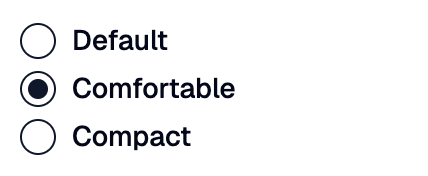
A Shadcn radio group: a set of options where only one can be selected.
Example:
shad.RadioGroup(
    value="comfortable",
    items=[
        shad.Radio(value="default", label="Default"),
        shad.Radio(value="comfortable", label="Comfortable"),
        shad.Radio(value="compact", label="Compact"),
    ],
)
Inherits: LayoutControl
Properties
description- Helper text shown below this group.error_text- An error message shown in red below this group.horizontal- Whether to lay outitemsin a row instead of a column.items- The options of this group.label- The label shown above this group.spacing- The space betweenitems.value- Thevalueof the selected option.
Events
on_change- Called when the selected option changes.
Example
Shadcn RadioGroup
play_arrowTry Online
import flet_shadcn_ui as shad

import flet as ft


def main(page: ft.Page):
    page.title = "Shadcn RadioGroup"

    def handle_change(e: ft.Event[shad.RadioGroup]):
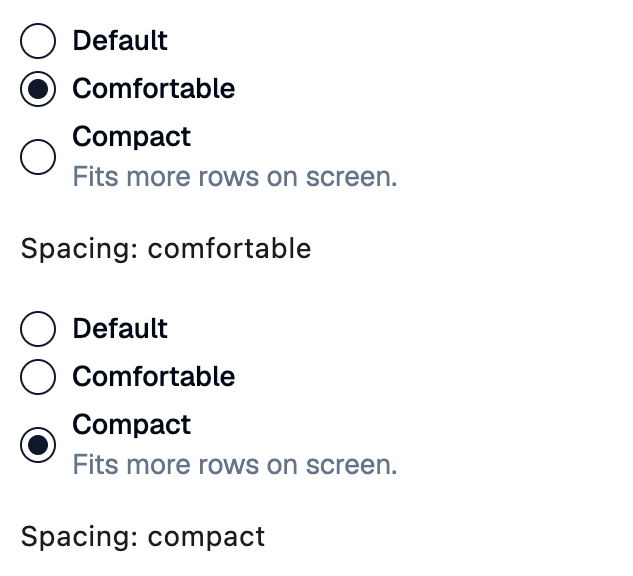
        selection.value = f"Spacing: {e.control.value}"

    selection = ft.Text("Spacing: comfortable")

    page.add(
        ft.SafeArea(
            content=ft.Column(
                spacing=16,
                controls=[
                    shad.RadioGroup(
                        value="comfortable",
                        on_change=handle_change,
                        items=[
                            shad.Radio(value="default", label="Default"),
                            shad.Radio(value="comfortable", label="Comfortable"),
                            shad.Radio(
                                value="compact",
                                label="Compact",
                                sublabel="Fits more rows on screen.",
                            ),
                        ],
                    ),
                    selection,
                ],
            )
        )
    )


if __name__ == "__main__":
    ft.run(main)
Properties
descriptionclass-attributeinstance-attribute
description: StrOrControl | None = NoneHelper text shown below this group.
error_textclass-attributeinstance-attribute
error_text: str | None = NoneAn error message shown in red below this group.
Set it after validating the value, and set it back to None (or an empty
string) to clear the error.
horizontalclass-attributeinstance-attribute
horizontal: bool = FalseWhether to lay out items in a row instead of a column.
itemsclass-attributeinstance-attribute
items: list[Radio] = field(default_factory=list)The options of this group.
labelclass-attributeinstance-attribute
label: StrOrControl | None = NoneThe label shown above this group.
It turns red while error_text is set.
Events
on_changeclass-attributeinstance-attribute
on_change: ControlEventHandler[RadioGroup] | None = NoneCalled when the selected option changes.
The data property of the event handler argument
contains the new value.