Slider
A Shadcn slider for picking a number from a range.
The slider needs a bounded width: inside a Row, set
width or expand.
Example:
shad.Slider(value=0.33, width=300)
shad.Slider(value=50, min=0, max=100, divisions=10)

Inherits: LayoutControl
Properties
active_track_color- The color of the track betweenminand the thumb.divisions- The number of equal steps betweenminandmax.inactive_track_color- The color of the track between the thumb andmax.max- The largest value.min- The smallest value.thumb_color- The fill color of the thumb.value- The current value, betweenminandmax.
Events
on_change- Called continuously while the user drags the thumb.on_change_end- Called when the user releases the thumb.on_change_start- Called when the user starts dragging the thumb.
Example
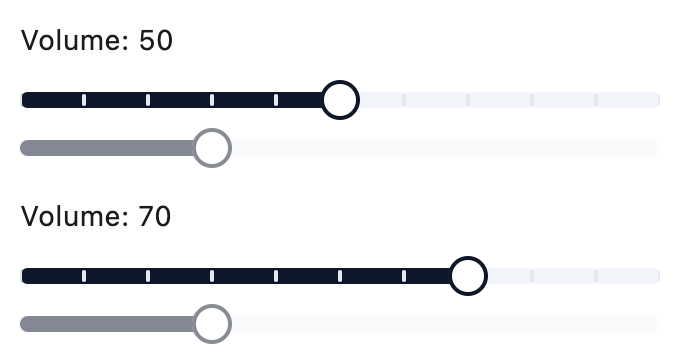
Shadcn Slider
import flet_shadcn_ui as shad

import flet as ft


def main(page: ft.Page):
    page.title = "Shadcn Slider"

    def handle_change(e: ft.Event[shad.Slider]):
        volume.value = f"Volume: {int(e.control.value)}"

    volume = ft.Text("Volume: 50")

    page.add(
        ft.SafeArea(
            content=ft.Column(
                width=320,
                spacing=16,
                controls=[
                    volume,
                    shad.Slider(
                        key="volume",
                        value=50,
                        min=0,
                        max=100,
                        divisions=10,
                        on_change=handle_change,
                    ),
                    shad.Slider(value=0.3, disabled=True),
                ],
            )
        )
    )


if __name__ == "__main__":
    ft.run(main)
Properties
active_track_colorclass-attributeinstance-attribute
active_track_color: ColorValue | None = NoneThe color of the track between min and the thumb.
If None, the primary color of the theme is used.
divisionsclass-attributeinstance-attribute
divisions: int | None = NoneThe number of equal steps between min and max.
If None, any value in the range can be picked.
Raises:
- ValueError - If it is not strictly greater than
0.
inactive_track_colorclass-attributeinstance-attribute
inactive_track_color: ColorValue | None = NoneThe color of the track between the thumb and max.
If None, the secondary color of the theme is used.
maxclass-attributeinstance-attribute
max: Number = 1.0The largest value.
Raises:
- ValueError - If it is not strictly greater than
min.
minclass-attributeinstance-attribute
min: Number = 0.0The smallest value.
Raises:
- ValueError - If it is not strictly less than
max.
thumb_colorclass-attributeinstance-attribute
thumb_color: ColorValue | None = NoneThe fill color of the thumb.
If None, the background color of the theme is used.
Events
on_changeclass-attributeinstance-attribute
on_change: ControlEventHandler[Slider] | None = NoneCalled continuously while the user drags the thumb.
The data property of the event handler argument
contains the new value.
on_change_endclass-attributeinstance-attribute
on_change_end: ControlEventHandler[Slider] | None = NoneCalled when the user releases the thumb.
The data property of the event handler argument
contains the final value.
on_change_startclass-attributeinstance-attribute
on_change_start: ControlEventHandler[Slider] | None = (
    None
)
Called when the user starts dragging the thumb.